
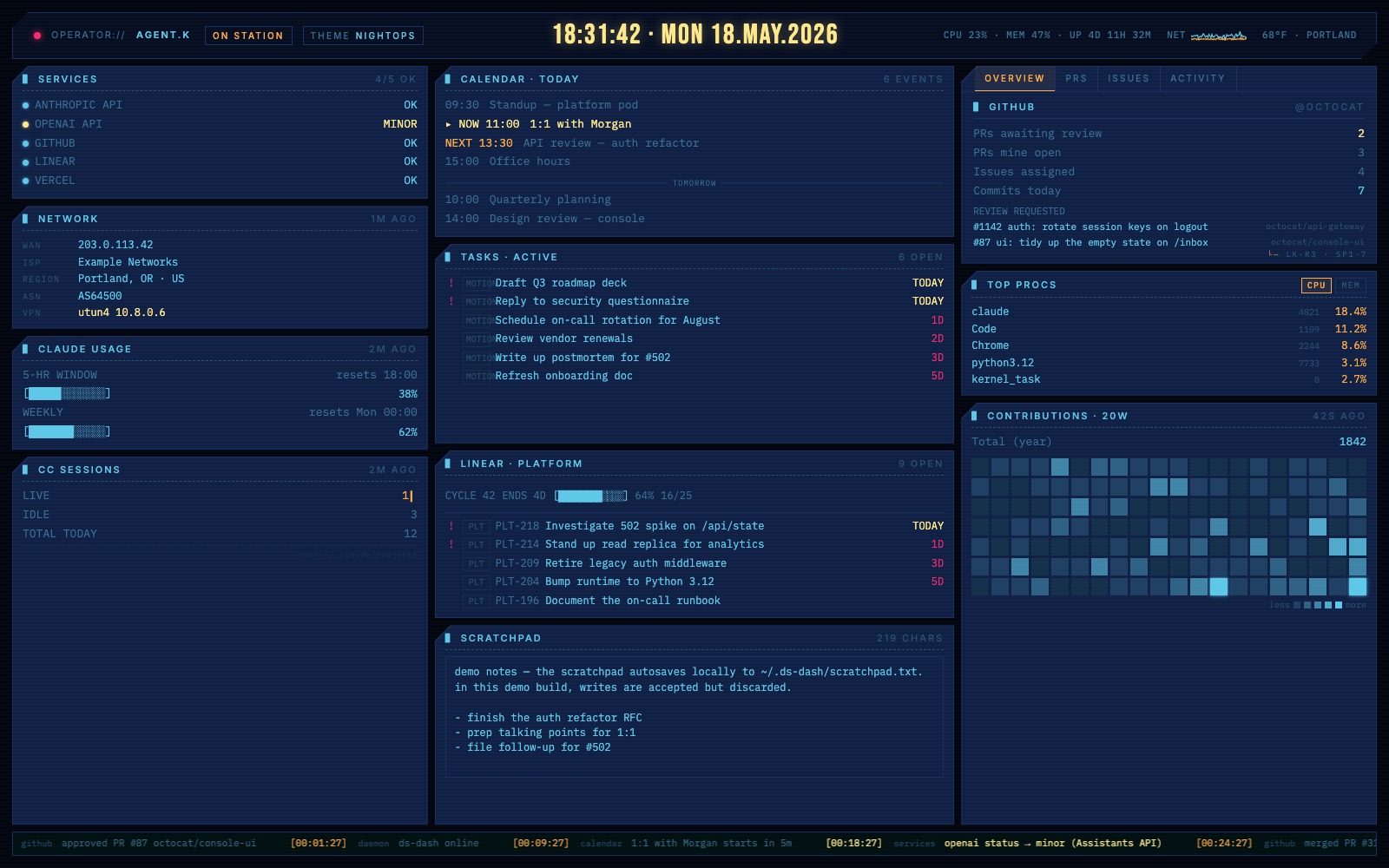
I built a local-only personal dashboard for myself. Sharing in case it's useful to anyone else.
I've been wanting one screen that shows me everything I actually care about during the workday — without juggling tabs, without picking up my phone, and without sending my data to anyone else's cloud. So I built one.
It's called ds-dash. A small Python daemon polls a handful of providers on a schedule and writes their state into memory; a single static HTML page renders it as a cinematic ops console that I leave open on a second monitor. No build step, no database, no auth. Everything runs on localhost.
What it currently shows me:
- - GitHub — PRs awaiting my review, my open PRs, assigned issues, recent activity, contribution heatmap
- - Calendar — today's events with NOW / NEXT markers (via ical-buddy on macOS)
- - Tasks — Motion's queue
- - Linear — one panel per workspace, with the current cycle's progress
- - Claude Code usage — 5-hour and weekly burn against rate limits, plus live/idle session counts
- - Service status — Anthropic, OpenAI, GitHub, Linear, Vercel
- - System — CPU/mem/disk plus a net-throughput oscilloscope (via psutil)
- - Network — WAN IP, ISP, region, VPN state
- - Weather — current temp for a zip code (via Open-Meteo)
- - Scratchpad — local notes that autosave
It's stupidly easy to extend with AI tooling.
The repo ships with a CLAUDE.md that documents the polling pattern, the STATE shape every provider writes into, the status vocabulary the frontend understands, and the conventions for ticker events, polling intervals, error handling, and secrets — essentially an instruction manual for an AI agent.
There's a companion docs/FRONTEND.md for the UI side, with the design tokens, palette, and render conventions.
In practice, "add a provider that shows my AWS billing" or "add a panel for Jira tickets assigned to me" or "give me a new theme that looks like a 90s amber CRT" is usually one Claude Code (or Codex, or Cursor) prompt away from a working implementation. No build step + single static frontend + panels that render defensively against missing data = the iteration loop is instant. Most of the existing providers were built that way.
Caveats: this is built for my workflow, on my laptop
- - No authentication. It binds to 127.0.0.1 by default. Anyone who can reach the host can read everything (including the scratchpad endpoint, which is also writable). Don't expose it to the open internet.
- - macOS-first. Calendar reads via ical-buddy; Claude OAuth has a macOS Keychain fallback. It runs on Linux but the calendar panel is dark there.
- - Opinionated providers. If you don't use Motion or Linear, those panels just show OFFLINE.
- - Personal-scratch project. Issues and small PRs welcome, no SLAs implied.
So: probably not the right tool for your team. Probably the right tool for someone who wants a single-pane-of-glass for their own stuff on a trusted machine, likes the no-build / no-DB "it's just a Python process" model, and doesn't mind editing a TOML config to wire it up.
Repo, screenshots, and setup: https://github.com/devondragon/ds-dash
If you do try it and something's broken, tell me. If you don't, that's totally fine — sharing because I use it every day and figured someone else might find it useful too.
No comments yet